




The humble browser is about to have its day. Are you ready for this?
We’re not talking about Chrome or Edge with AI (artificial intelligence) add-ons. We’re already passed that. We’re talking about AI-native browsers like Comet and Dia. These browsers are no longer passive tools; rather, they’re intelligent assistants embedded deep into every layer of the enterprise. AI-native browsers like Comet and Dia are transforming how work gets done by summarizing content, orchestrating workflows, and offering real-time decision support through agentic intelligence.
Obviously, with this level of transformation comes new and existing risk. The AI-native browsers don’t just read pages. Instead, they remember sessions, interpret prompts, and interact with potentially sensitive data in ways traditional security tools can’t see or govern. Malicious extensions, prompt manipulation, data leakage, LLM hallucinations, and compliance blind spots emerge as threats in the new frontier.
The enterprise browser has evolved. Security and governance strategies must as well.
What is an AI Browser?
An AI browser is a web browser that is built from the ground up with AI at the core of the user experience, and no user intervention is required to activate the models. This is unlike traditional browsers augmented with AI plug-in tools that require manual activation.
These tools act as real-time assistants. They summarize content, automate tasks, understand context, and interact with web applications. All of it happens within the workflow, without requiring the user to switch tools or change interfaces.
Variations:
- AI-Native Browsers
Built from the ground up with AI at the core of their user experience.
Examples: Comet by Perplexity, Dia by The Browser Company (now part of Atlassian)
- AI-Augmented Browsers
Traditional browsers that have AI tools added as extensions or built-in features.
Examples: Chrome with Gemini, Edge with Copilot, Brave with Leo
- “Enterprise” Secure Browsers
Security-focused browsers designed for enterprise use, with built-in AI policy enforcement and visibility.
Examples: Island, Prisma (Formerly Talon)
Why Do We Need AI Browsers?
AI browsers are not just a novelty. They are emerging as essential tools in the modern enterprise, reshaping how individuals and teams engage with information, complete tasks, and make decisions. Here are four reasons why:
They meet users where they already work
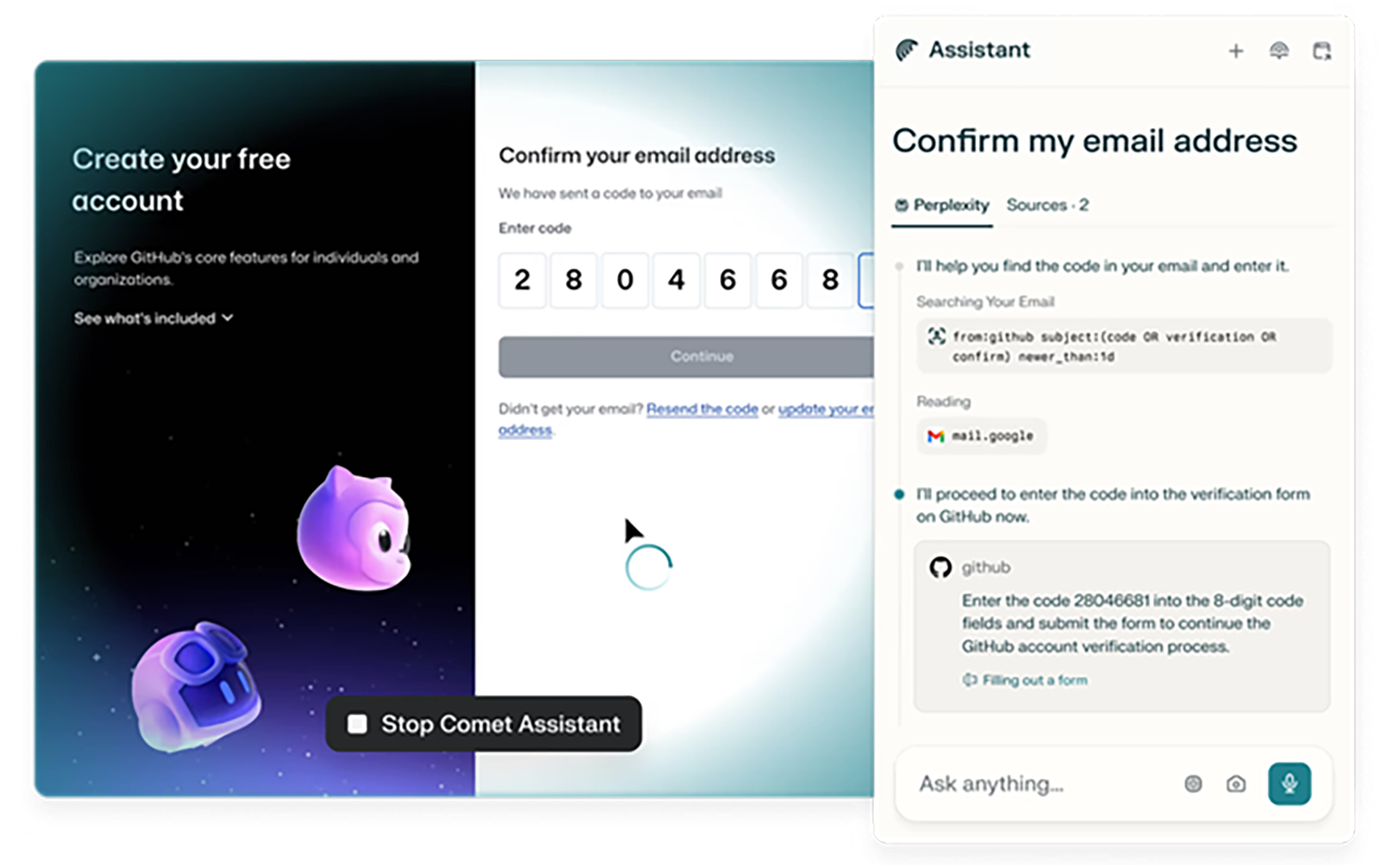
Peplexity Ways to Use Comet
Most enterprise workflows live in the browser. AI browsers embed intelligence directly into these workflows, allowing users to receive summaries, recommendations, and multi-step task automation without leaving the page or switching tools.[1]
They boost productivity across roles
From drafting responses to summarizing long documents and navigating various interfaces, AI browsers reduce the time and mental effort required to get work done. This unlocks time savings for every role, from the executive suite to customer support.
They provide context-aware assistance
AI browsers track what the user is doing across tabs and sessions. This context is used to provide smarter, more relevant responses. Instead of treating each interaction as isolated, the browser learns patterns and adapts to the flow of work.
They enable intelligent workflow orchestration
|
Some AI browsers can automate routine workflows. Examples include scheduling meetings, filling out repetitive forms, or gathering answers from multiple internal tools. These agentic behaviors move beyond passive AI chat or reactive assistant and toward proactive digital assistance.
These are examples of powerful functions of AI browsers, which also introduce exponential privacy concerns. Because the browser sees and remembers what the user is doing, it may:
- Aggregate sensitive data unintentionally from unrelated systems or workflows (financial records in one tab, legal research in another).
- Retain contextual memory of sensitive sessions (incident response, executive communication) long after the task has ended.
- Expose regulated or confidential activity if prompt history or tab memory is stored or shared with external inference services.

Risks in Using AI Browsers
As with any new powerful tool, the benefits of AI browsers come with meaningful risks. These risks are especially critical in enterprise environments, where sensitive data, regulatory obligations, and attack surfaces intersect daily workflows.
-
Privacy Implications of Context-Aware Assistance
AI-native browsers observe and remember. While their ability to track user behavior across tabs, sessions, and workflows enables more intelligent support, it also creates exponential privacy risk:
- Persistent Context Memory: Even after a tab is closed, AI browsers may retain session context. This raises concerns about long-term exposure to sensitive tasks (legal reviews, executive communications).
- Cross-Workflow Aggregation: When an AI browser sees multiple apps at once (HR system, CRM, document management), it can unintentionally connect dots that the enterprise wanted siloed, resulting in implicit data aggregation.
- Inference via Interaction Patterns: Even without direct data exfiltration, the browser’s understanding of user behavior can reveal workflows, business logic, or sensitive operational patterns.
- Third-Party Exposure Risks: If any of the AI processing is offloaded to cloud-based models or unverified APIs, sensitive prompts and protected data may be exposed beyond the organization’s governance boundary.
- Surveillance-Like Behavior: For regulated environments (HIPAA, PCI, FINRA), the browser’s memory can mimic surveillance or violate least-privilege access principles.
-
Data Leakage and Unintentional Exposure
AI browsers often process user activity and content in real-time. This means sensitive data, including customer records, financial details, source code, or internal documentation, may be ingested or cached by the AI model, intentionally or not. Without proper guardrails, this can lead to:
- Unintentional sharing of confidential information via prompt interactions
- Model training on private enterprise data
- AI assistants surfacing restricted data across tabs or sessions
-
Loss of Observability
Traditional browser activity can be monitored through network logs, EDR, and proxy inspection. But AI browsers often operate inside the rendering layer, with encrypted or opaque agent activity that existing tools cannot see. This creates:
- Gaps in visibility for the SOC and compliance team
- Blind spots in DLP and behavioral analytics
- Limited auditability of AI-driven interactions
-
Malicious Extension Risk
AI-enhanced and AI browsers may be susceptible to browser extensions that are poorly vetted or that request elevated privileges. Attackers may use these to:
- Steal session tokens or access cookies
- Modify AI model behavior
- Inject malicious prompts or exfiltration paths
-
Manipulation and Prompt Injection
AI browsers can interpret natural language and act on it. This opens a new class of attacks, including:
- Prompt injection through web page content, email, or other files
- Cross-site prompt influence (one tab manipulating another)
- Model redirection by adversarial phrasing
-
Compliance and Policy Evasion
AI browsers may not respect existing enterprise policies by default. For example:
- Downloading unapproved content
- Sending prompts to external APIs not covered by existing data processing agreements
- Producing output that cannot be verified, traced, or attributed
- Organization output becomes flagged as AI-generated

Additional Considerations for Vendors and Partners Using AI Browsers
When third-party vendors, contractors, or partners use AI browsers in their interactions with your organization, the risk perimeter shifts. Even if your internal teams adopt strict controls, external entities might introduce new vulnerabilities, often without realizing it. Here are some things to consider:
-
-
Expanded Data Exposure Boundaries
-
- Vendors and partners often access internal portals, shared files, ticketing systems, or sandbox environments. If they’re using AI-native browsers, or AI-enhanced browsers with plugins:
-
- Sensitive data may be processed, stored, or retained in their AI tooling.
- Prompts or summaries generated by their browser may inadvertently capture and persist internal data.
- Their AI model context may continue to retain what it learned after their engagement ended.
-
-
Uncontrolled Third-Party AI Policy
- You may have enforced policies on your own employees, but most enterprises lack visibility into:
Whether vendors are using AI-native browsers or AI-enhanced plug-ins at all. - Data processed by a partner’s browser may violate data residency or data handling agreements.
- Prompt or model activity may fall outside the scope of existing audits or certifications.
-
-
-
-
Contractual and Regulatory Spillover
-
-
Your organization may be held responsible for vendor or partner behavior in regulated environments. For example:
-
- A vendor’s AI-generated output may be flagged as synthetic in a legal dispute.
- Data processed by a partner’s browser may violate data residency or data handling agreements.
- Prompt or model activity may fall outside the scope of existing audits or certifications.
-
-
-
Threat of Shadow AI Use in External Teams
-
-
Vendors may rely on AI-native browser tools to boost efficiency. Expect it particularly in customer support, marketing ops, and engineering delivery. Without disclosing it, this opens risk for:
-
- Unvetted prompts, including your proprietary data
- Ai-initiated actions (form submissions, code generation) with unclear traceability
- Brand impact from misaligned or hallucinated output generated in your name.
Practical Steps to Evaluate AI Browser Security
Organizations embracing AI browsers must extend their security model beyond legacy browser controls. Unlike traditional browsers, AI-native and AI-augmented browsers introduce new modes of interaction, persistent context, and invisible data flows, all of which challenge existing monitoring and policy tools.
Here are practical steps for evaluating and managing the security of AI browser deployments:
-
Assess Visibility and Control Capabilities
Can your security team see and govern what’s happening inside the browser?
- Audit support for AI-assisted actions and content generation
- Monitor prompt history, summarization usage, and AI tool interactions
- Identify gaps in EDR or CASB observability
Some browser security tools provide deep browser-level inspection and control, even when AI is in play. This class of tooling enables organizations to set policies specific to AI usage, including blocking prompts with sensitive data, flagging high-risk domains, or monitoring exfiltration attempts by AI suggestions.
-
Evaluate AI Input and Output Flow
Understand how data is being used by the AI in the browser:
- Does the browser store or retain session context across tabs or restarts?
- Are prompts or page contents sent to third-party APIs for inference?
- Can AI-generated output be attributed and verified?
You’ll want clarity on whether AI reasoning occurs locally, in secure environments, or offloaded to public cloud models. If hybrid approaches are used, ensure compliance boundaries are enforced.
-
Apply Role-Based AI Access Controls
AI access should not be one-size-fits-all. Define usage policies by persona:
- Limit auto-summarization for high-privilege users like finance and legal.
- Disable AI suggestions in regulated workflows like medical records and export-controlled IP.
- Allow productivity AI for roles with low data sensitivity but high task volume
-
Monitor Third-Party AI Tool Usage
AI risk doesn’t stop at your employees. Vendors and contractors may introduce AI-native or AI-augmented browsers into your environment without visibility or intent to violate policy. Shadow AI use can compromise both trust and compliance boundaries, and creates risk spillover that your controls must anticipate.
- Require AI usage disclosures in vendor onboarding and assessments
- Extend browser-level controls (via plugins or other mechanisms) to managed third-party sessions. This includes your VDI environments and jump servers
- Set policy expectations for AI summarization, prompt handling, and data retention in contracts
- Implement privileged access and session recording for access to regulated systems
- Remember the environmental facilities service providers, HVAC, power, etc.
-
Define Acceptable AI Interactions Per Workflow
Not every use of AI in the browser may be appropriate for your organization. Determine which tasks and workflows benefit from AI augmentation, and where it is likely to introduce noise, hallucinations, or liability. For example,
- Permit AI summaries for internal documents, but maybe block for customer data
- Allow agentic workflows in sandboxed apps, but consider blocking automation in financial systems
- Enable tab-aware AI recall for R&D, but perhaps disable it in legal review
- Flag or restrict AI output used in outbound communications
These suggested controls required fine-grained inspection of how, when, and where AI interacts with browser content. Capabilities are now offered by browser security tools, with specific AI policies tied to user context, role, and domain.
-
Create a Secured AI usage and Prompt Audit Trail
To ensure accountability and compliance in AI-augmented workflows, organizations must treat prompt and response activity as part of the digital record, and it must be secured accordingly. Consider how all the logs, browsing and search history, AI assistant interactions, technical logs (device, crash reports), and perhaps IP addresses are handled and secured.
- Log prompt history tied to session and user ID
- Record when summarization, autofill, or suggestions were used in workflows
- Store AI-generated output with metadata, version history, and source context
- Monitor for repeated or anomalous prompt patterns (data scraping, phishing)
These audit trails are not theoretical. Browser security tools now provide the ability to log AI usage at the prompt and output level, tying it to individual sessions, users, and workflows. This enables security, compliance, and legal teams to investigate incidents, validate disclosures, and prove regulatory controls, even when the AI itself forgets.
Note: If vendors or external users operate outside your managed browser environment, you won’t be able to audit their AI usage.
Policy Design for AI Browser Governance
As organizations begin adopting AI browsers, the security conversation must expand beyond risk detection into policy enforcement and long-term governance. In order to institutionalize controls, accountability, and behavioral boundaries that align with your enterprise’s risk appetite, data sensitivity, and compliance posture.
-
-
Establish a Cross-Functional AI Governance Group
- Include Stakeholders from security, legal, compliance, IT, procurement, and HR.
- Define AI browser policy ownership and escalation workflows.
- Align AI browser governance with existing AI usage policies and responsible AI principles.
-
-
-
Create and Enforce Risk-based Zones Aligned with Data Classification
-
Not all browser activity should be treated equally. Combine data sensitivity labels with AI trust zones to determine where and how AI features are allowed. See the table below for an example.

Implementation Tip: Browser security tools can enforce these boundaries based on data classification labels, user role, application, or domain. You can:
-
- Block AI usage on specific pages or input fields
- Disable summarization or form auto-fill in “confidential” zones
- Flag or log AI usage involving sensitive content
-
-
Design for Consent and Awareness
- Require explicit user acknowledgment when AI is used in sensitive workflows.
- Display watermarks or in-browser banners to indicate when content is AI-generated or summarized.
- Transparently disclose what data may be processed by AI, especially when external APIs are involved.
-
-
-
Codify Acceptable Use in Policy Documents
- Define acceptable vs. prohibited AI browser usage clearly. Embed this guidance in:
- IT acceptable use policies
- Employee handbooks and onboarding
- Vendor agreements and NDAs
-
Closing the Loop on AI Browser Risk
AI-native browsers will rapidly reshape how work gets done by embedding intelligence into every click, tab, and workflow. With this leap in capability comes a parallel leap in exposure. These browsers introduce new attack surfaces, opaque data flows, and decision-making logic that security teams can’t afford to ignore.
By pairing deep browser-level observability with AI-specific policy controls, organizations can move from reactive risk mitigation to proactive governance. Whether it is protecting internal workflows or securing third-party access, closing the loop on AI browser risk demands both architectural foresight and tactical enforcement.
The AI browser is not just another endpoint. It’s the new execution layer of the enterprise. Time to treat it so.
Contact HALOCK Security Labs to evaluate your organization’s readiness to adopt and govern the AI browser and see if they can help mitigate the risks.
Review Your AI Security and Risk Posture
Review Your CoPilot Security Position
Read more AI (Artificial Intelligence) Risk Insights
Appendix A – Glossary of Terms
AI-Native Browser – A browser built from the ground up with AI integrated directly into its core functionality. It offers real-time assistance such as summarization, task automation, and contextual awareness without requiring manual activation of plugins or tools.
AI-Augmented Browser – A traditional browser (Chrome or Edge) enhanced with AI tools via extensions or built-in features. These tools are typically user-initiated and less deeply integrated into the browser’s workflow.
Agentic Intelligence – AI that goes beyond passive response to actively taking action, including initiating tasks, making decisions, and navigating multi-step workflows on the user’s behalf. Often used to describe proactive, workflow-aware AI behaviors.
Tab-Aware AI Recall – The ability of an AI browser to remember and understand user activity across multiple tabs in real-time. This enables contextual assistance based on actions and content spread across an entire browsing session, not just the current tab.
Prompt Injection – A type of adversarial input attack where malicious or hidden prompts are embedded in content to manipulate the behavior of an AI model, often without the user’s awareness.
Context Persistence – The browser’s ability to remember user activity across tabs, sessions, and applications, to provide more informed contextual AI responses. This also introduces data retention and privacy concerns.
Shadow AI – The unsanctioned use of AI tools (often by third-party vendors or internal users) outside the governance or visibility of security and compliance teams.
Enterprise Secure Browser – A browser designed specifically for corporate use, with built-in security and policy enforcement features. Some now include native controls for AI usage and risk mitigation.
LLM Hallucination – When a large language model generates incorrect or fabricated information that appears plausible but is not grounded in reality or fact.
Exfiltration via Suggestion – A potential data leakage scenario in which AI-generated suggestions surface to transmit sensitive data.
AI Policy Enforcement – Governance controls applied specifically to AI interactions, such as blocking certain prompts, logging AI-assisted activity, or limiting model access based on user role or task type.
VIDEO Example: Indirect Prompt Injection | How Hackers Hijack AI – Seven Seas Security https://www.youtube.com/watch?v=s-rOBuZWbQE
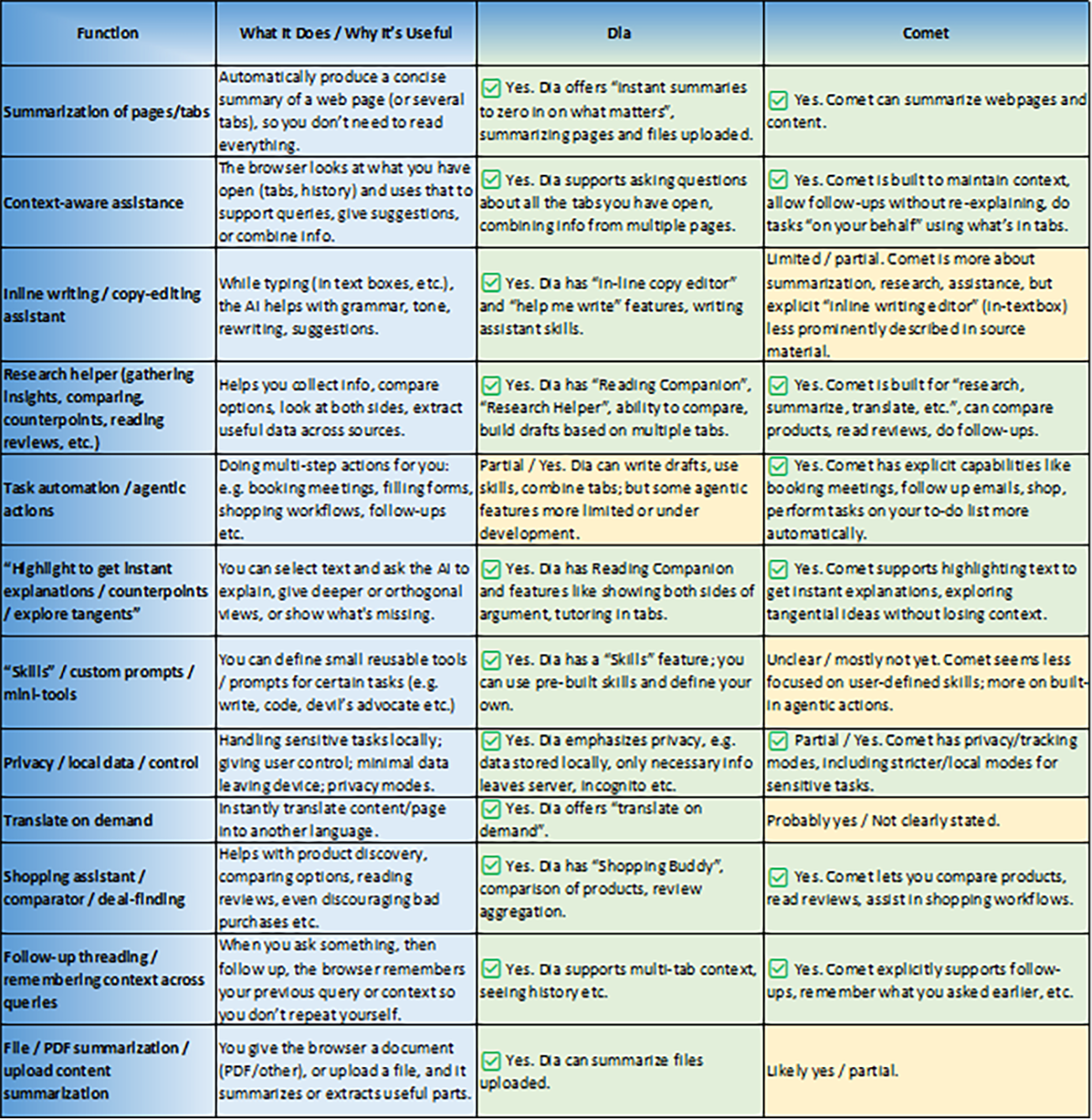
Appendix B – Useful AI Browser Functions
Appendix C – Potential Questions to Ask Vendors About AI Browser Use
Are your employees or contractors using AI-native browsers (Comet, Dia) or AI-augmented browsers (Chrome with Gemini, or Edge with Copilot)?
Do you maintain an internal inventory of browser plugins in use by your team?
Can AI browsers in use by your teams access, process, or store information shared by our organization (in portals, support tickets, or collaborative tools)?
Are prompts, page content, or summaries retained across sessions or transmitted to third-party APIs?
Are AI features (summarization, autofill, task suggestions) configurable or restricted in regulated workflows?
Can your team disable AI interactions where required (finance, legal, IP)?
Do you monitor or log AI browser activity such as prompt input/output, data summarization, or form interactions?
Is AI browser behavior auditable by your internal security or compliance teams?
Do you have governance policies specific to AI browser use?
Are your AI browser practices aligned with our data handling or data processing agreements and regulatory requirements?
How do you ensure AI-generated output related to our organization is not retained, reused, or exposed after the engagement ends?
Are you willing to include AI-specific browser clauses in our contract (no summarization of client data, no off-platform AI inference)?
Appendix D – Resources
Products and Platforms Mentioned with Useful Links
Comet AI Browser by Perplexity
https://www.perplexity.ai/comet
Comet AI Browser Data Privacy & Security FAQ’s
https://www.perplexity.ai/comet/resources/articles/comet-data-privacy-security-faq-s
Perplexity Settings to opt out of model training
https://perplexity.ai/settings
Perplexity Trust Hub
https://trust.perplexity.ai/
Dia Browser by The Browser Company (Now part of Atlassian)
https://www.diabrowser.com/
Chrome with Google Gemini
https://gemini.google.com/app
Microsoft Edge with Copilot
https://www.microsoft.com/en-us/edge/features/copilot
Brave with Leo AI
https://brave.com/leo/
LayerX Browser Security Platform
https://layerxsecurity.com/
Island Enterprise Browser
https://www.island.io/
Prisma (Formerly Talon)
https://www.paloaltonetworks.com/sase/prisma-access-browser
Further Reading
LayerX & Perplexity: Enterprise Security for AI Browsers
https://techintelpro.com/news/ai/enterprise-ai/layerx-pioneers-enterprise-security-for-perplexitys-comet-ai-browser
