



The fastest way into an organization is through the people who hold the keys. As we have seen from the Salesloft and other recent attacks, service desks, help desks, and SaaS administrators distributed throughout lines of business are now prime targets. The attackers’ goal: a foothold in the company by obtaining an identity for use to pivot and escalate access until complete system ownership is achieved. A password reset, an MFA (multifactor authentication) bypass, or an “approved” OAuth app can undermine layers of technical defense.
There was a cartoon by John Klossner years ago: “In this corner we have Firewalls, IdP, XDR, MFA, etc., …and in this corner we have Dave!” Poor Dave is standing there wearing a shirt that reads, “User Error”. Attackers know who wins if Dave the SaaS administrator is tricked.
The common thread in all of the recent successful attacks is a failure of the identity proofing process. There are two primary risks at work involving challenges with Identity Proofing. First, the service desk may be tricked into validating the wrong person. Second, attackers may impersonate company employees or vendor partners to convince users or admins to take unsafe actions using facts about the employees or vendor as proof, or even deepfakes of an employee or vendor contact.
There are multiple methods to reduce the risk of a successful social engineering attack at the service desk. The three addressed herein are a two-approver approval process, moving password reset decisions away from the service desk via self-service password management, and advanced security awareness training for users.
1. Use a Two Approver Workflow at the Service Desk
An effective quick win is to require a Two-Approver workflow for high-risk actions, such as OAuth app consents for administrative actions. Paired with vendor callback validation for identity proofing and regular Red Team testing, this stops one person from being pressured or misled into a compromising decision.
Social engineers impersonate employees, partners, or customers to push for resets or MFA bypasses. Agents are pressured to resolve issues quickly and with a positive experience for the caller.
QUICK WIN: Two-Approver Workflow with Vendor Validation
Simple and Effective
The Salesforce OAuth compromise succeeded because one admin could be convinced to approve a connected app. Two-Approver removes that single point of failure. Adding a vendor validation stage via contact number ensures neither approver is acting on a false request.
SCENARIO
- Your company’s SaaS Admin A receives a phone call with an urgent requirement from an attacker purporting to be the “vendor” requesting your company’s Admin A to approve a new connected application to prevent disruption of service, or after an update. The attacker pretending to be your “vendor” follows up with a convincing email including instructions and contact information. Admin A logs the request in the IT Service Management system (ServiceNow, Jira, etc. If the attacker “vendor” calls, thank them over the phone and explain that the request will follow a change review and approval process. Then hang up.
- Your company’s Admin A reviews the request and calls the published vendor support number (not the one in the email) to confirm the case is real. Upon confirmation, your company’s Admin A can approve the request, at which point it goes to a second approver, your company’s Admin B.
- Your company’s Admin B independently checks the IT Service Management (ITSM) ticket, reviews the request, and ensures that vendor validation is documented. If still uncertain, your company’s Admin B may also call the vendor directly using the published channel.
- Only after both approvals and validation does the change go through.
WHY THE TWO-APPROVER PROCESS WORKS
- Eliminates single-person decisions under pressure.
- Anchors the process to the trusted vendor contact details.
- Produces an auditable trail tied to tickets, vendor confirmation, and approvers.
- Rolls out quickly with IT Service Management (ITSM) or Privileged Account Management (PAM) tools already in place.
IMPLEMENTATION STEPS
1. DEFINE THE SCOPE
- Apply Two-Approver plus vendor validation to high-risk actions: OAuth app approvals, MFA resets for privileged accounts, and SaaS administrative changes.
2. ESTABLISH TRUSTED VENDOR CHANNELS
- Document official vendor support numbers, portals, and account representatives in your ITSM knowledge base. Train staff to use only these; never contact details from emails or voicemails.
- Red team this control: test staff with fake vendor calls and reward those who insist on following the process and using the published contact information.
3. IT SERVICE MANAGEMENT DRIVEN TWO-APPROVER WORKFLOW
- Require all high-risk requests to begin with a ticket in ServiceNow, Jira, or equivalent.
- Configure workflow for two independent approvers.
- Add a required field: “Vendor validated” Yes/No.” Approval cannot progress without it.
4. ENFORCE THROUGH PAM AND IdP (IDENTITY PROVIDER)
- Remove standing admin rights. Place SaaS admin accounts under PAM control so access is only granted just-in-time.
- Use the IdP (Okta, Azure AD, Ping) to enforce MFA and conditional access for elevated roles.
- Integrate PAM with ITSM workflows via APIs. PAM connects directly to ITSM systems (ServiceNow, Jira) so that approval status in the ticketing system directly gates whether PAM will release credentials or allow elevation.
-
Require dual approval tied to ITSM tickets for Privileged access.
-
All privileged access requests (in scope) must start with an ITSM ticket.
-
PAM validates the ticket ID, status, and approvals through the API.
-
Policies enforce that two independent approvers must authorize the ticket before PAM releases credentials or broker a privileged session.
-
If approval is missing, PAM blocks the request.
-
-
- Admin sessions to critical systems are time-bound, brokered, and recorded, with all activity tied to the approved ITSM ticket for audit.
- In on-prem environments, this can be enforced through a “jump” server or bastion host. In SaaS and cloud environments, modern PAM and IdP integrations provide session brokering and recording without the need for jump servers.
5. TRAIN AND SCRIPT
- Provide staff with scripts for refusing unsafe requests: “I cannot approve this without a ticket, vendor validation, and a second approver.”
- Train Admin A on documenting vendor callbacks, and Admin B on verifying them.
- Run routing Red Team drills and reward staff who catch attempts.
6. PHASE ROLLOUT
- Start with Salesforce and one other critical SaaS.
- Expand to cover all privileged accounts across SaaS services.
- Integrate into IAM (Identity and Access Management) governance for scalable enforcement.

2. Remove the Decision to Reset a Password from the Service Desk
While the Two-Approver process outlined is an effective approach for validating privileged and other high-value credentials, it is not a feasible approach for the everyday need for password resets. It is not uncommon to see metrics from the Service Desk that show up to 40% of all submissions to the Service Desk are for password resets. This would make the Two-Approver process unsustainable. A common approach is to implement a Self-Service Password Reset (SSPR) capability so that users can service themselves.
Why SSPR works
- Users are enabled to self-enroll in multiple ways to perform future validation for password resets. Self-enrollment itself is validated with valid authentication credentials.
- SSPR is then enabled to support multiple pre-registered methods to validate users when a password reset is needed. These can be a combination of MFA, security questions, email one-time passwords, alternate email addresses, etc.
- Enforces customized password policies such as not allowing company name, or the top 100 compromised passwords, or one letter or number iterations from previous passwords.
- Integrated with multiple identity providers. Can reset multiple identity stores simultaneously.
- Offline Reset even when access is not available to the corporate network.
3. Advanced Security Awareness Training for the Service Desk
It used to be easier to identify social engineering and phishing attempts as threat actors, for example, who tended not to have the best translations to English or be able to speak English well. Poorly worded emails with spelling and grammatical errors were common. However, with the rapid proliferation and advancement of social media, AI (artificial intelligence), and associated tools, attackers can now easily craft convincing emails and deepfakes using available details about the person and/or the company for impersonation.
Snippets of voice and video recordings result in hard-to-detect deepfakes that can potentially convince a busy Service Desk into taking actions that may result in a breakdown of the defined and trained process for vetting users.
SCENARIO
An attacker created a Deepfake voice AI of one of the company’s executives using a recording of a recent podcast the executive was part of. The Deepfake AI is able to respond to the service desk person’s questions and provide additional information upon request.
SAMPLE INTERACTION
Service Desk: Hello, this is Barry. How can I assist you today?
Attacker: Hi, this is Fred Smith. I need to get my password reset immediately.
Service Desk: Hi, Mr. Smith, I can help you with that. I will send a code to your phone to validate you. Please read me the code once you have received.
Attacker: I don’t have my phone. I am getting ready to present at a conference, and I cannot get my presentation. I need the password reset immediately!
Service Desk: Ok, please provide me with some additional details so I can validate you.
Attacker: I live at…my wife and kids’ names are…etc.
Depending on the training the Service Desk has received, this tactic may be successful. Therefore, it is important to provide Security Awareness Training that utilizes the SAME METHODS the attacker does. Traditional slideware for training may not be good enough anymore. An approach that incorporates advanced AI and Deepfake methods is essential for keeping your employees aware and up to date for identifying these advanced attack methods.
Why Advanced Security Awareness Training works
AI-based Social Engineering Detection is Improved
- Deepfake voice and video impersonations can mimic executives, end users, or vendors requesting urgent password resets or MFA bypasses.
- Training teaches service desk staff to identify anomalies in tone, timing, and behavior, such as unnatural pauses, generic phrasing, or overly scripted urgency.
Reinforces Secure Verification and Authentication Protocols
- Tying into the Two-Approver method, employees practice multi-channel verification.
- The training scenarios demonstrate how an attacker can manipulate the service desk.
- Reinforces documented identity and escalation processes.
Increases Resilience Against Psychological Manipulation
- Attackers exploit emotional triggers by using urgency, fear, authority, or empathy.
- Teaches the service desk to pause and verify instead of reacting.
- Increase the confidence of the service desk in responding to high-pressure requests.
Stay in Touch with Emerging Threats
- Traditional phishing training doesn’t address synthetic identity, AI-voice fraud, or deepfake-enabled methods.
- By incorporating threats, knowledge retention is increased as these methods are relevant and engage employees.
Incorporating these three methods with your service desk will improve your resiliency to recent social engineering and phishing attack methods.
Key Takeaways for CISOs
- Identity (and People) is the perimeter. Service desks and SaaS administrators are the fastest path into your environment. Firewalls and MFA don’t matter if one pressured employee resets a password or approves a rogue OAuth application.
- Stop relying on weak identity proofing alone. Train staff to use only trusted channels already on record, such as portal pushes, registered manager contacts, or official vendor numbers for callback.
- Self-Service Password Reset solutions reduce the reliance on the service desk to make determinations on whose passwords should be reset.
- Eliminate single points of failure and standing admin rights. One admin should never have the power to approve high-risk changes requiring administrative access alone. Enforce Two-Approver workflows through ITSM, IdP, and PAM integration.
- Make resilience cultural. Red Team your service desk and admins with social engineering calls. Recognize and reward staff who refuse unsafe requests. Success is when someone says “no,” not when they simply work the fastest ticket queue.
- Implement advanced security awareness training that incorporates recent attack methods that are successful, that uses AI and Deepfakes.
Practical steps for users and administrators:
- Reinforce to users and administrators that IT and SaaS providers will never ask for passwords or MFA codes over the phone, email, text, etc.
- Require all changes and approvals to happen only through the official portal or ticketing system.
- Publish “safe vendor contact numbers” and require staff to use those numbers to validate requests, never numbers from an email or voicemail.
- Train admins throughout the organization, not just IT, with refusal scripts: “I cannot approve this without a ticket, vendor confirmation, and a second approver.”
- Red Team, the controls. Place fake vendor calls to your SaaS Administrators and Users and track how often staff follow policy and procedure, and reference the published numbers. Celebrate and reward Blue Team success.
Review Your Security and Risk Profile
Works Cited:
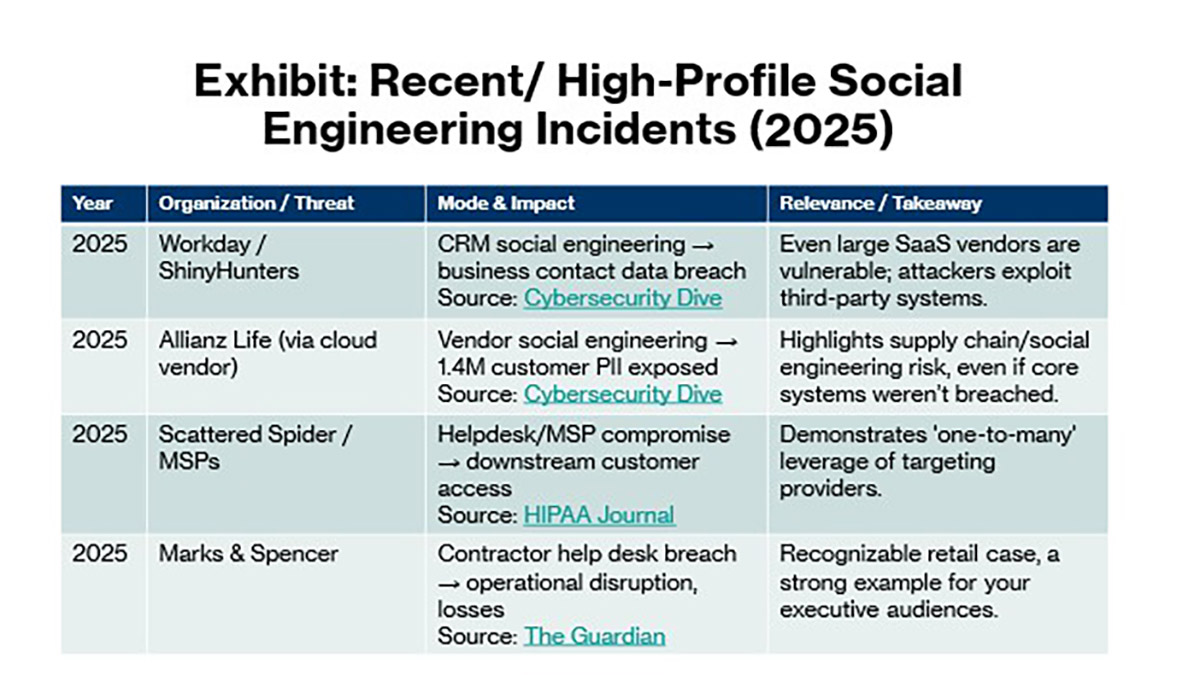
“Allianz Life discloses massive data breach linked to supply-chain attack.” Cybersecurity Dive, 2025, https://www.cybersecuritydive.com/news/allianz-life-data-breach-supply-chain-attack/754192/
“Hackers target Workday in social engineering attack.” Cybersecurity Dive, 2025, https://www.cybersecuritydive.com/news/hackers-target-workday-in-social-engineering-attack/758095/
“MSPs & IT Vendors Targeted by Scattered Spider Threat Group.” HIPAA Journal, 2025, https://www.hipaajournal.com/msps-it-vendors-targeted-scattered-spider
Butler, Sarah. “M&S expects cyber-attack to last into July and cost £300m in lost profits.” The Guardian, 21 May 2025, https://www.theguardian.com/business/2025/may/21/cyber-attack-cost-marks-and-spencer-lost-sales-company-results-reveal
“Resetting Passwords and Saving Time and Money at the IT Help Desk.” Duo Security Blog, https://duo.com/blog/resetting-passwords-and-saving-time-and-money-at-the-it-help-desk
