




What is Browser Security?
In most organizations, the web browser remains the most commonly used and least governed application in the enterprise. While most security programs treat it as a utility, attackers treat it as a platform. The browser now sits between the user, their credentials, sensitive data, SaaS applications, and critical business workflows. It is the connective layer between people and everything they touch.
And yet, in most environments, browser behavior is largely invisible. Extensions are installed freely. Settings vary by user, department, and device. Security teams cannot often see what is running in the browser, what data it can access, or where that data is going.
The result is that malicious or compromised browser extensions are being used to exfiltrate data, hijack sessions, and quietly bypass traditional endpoint controls. In many cases, these extensions begin as legitimate tools and are later updated with malicious capabilities. Users rarely notice. Controls do not detect the change. Policies often assume the risk is covered elsewhere.
Browser and extension security are an emerging enterprise threat surface that requires configuration, governance, and control standards. This is not about restricting productivity. It is about restoring visibility and defensibility to a layer of the enterprise that is currently operating without either.

What is The Threat Landscape for Browser Security?
The modern browser operates more like an application framework than a simple tool for navigating the internet. It stores credentials, runs code, maintains persistent sessions with cloud services, and acts as a gateway to business data. Yet in most environments, it is granted wide permission with little oversight.
The risk does not come from the browser itself. It comes from how it is used, extended, and assumed to be safe. Extensions are particularly problematic. Many are installed directly by users with no vetting, no policy enforcement, and no awareness of what those extensions can access.
While many threats begin with social engineering, tricking a user into authorizing actions or installing a seemingly helpful extension, the real danger lies in what happens next. A growing number of attacks involve legitimate extensions that are later updated to include malicious functionality. This tactic, known as a polymorphic attack, allows adversaries to operate within the boundaries of what security controls often trust. See the appendix for an article detailing the steps of this tactic.
Once installed, a malicious or compromised extension can read everything the user can see, access authentication tokens, capture clipboard contents, redirect traffic, and send sensitive data to external servers. These behaviors often go undetected by endpoint detection tools, especially if the extension was previously clean.
Enterprise environments are particularly exposed because extension activity is rarely monitored, and browser settings are inconsistent across departments and devices. Attackers know this, and they are increasingly treating the browser as the first foothold in the kill chain. It is fast, cheap, and almost invisible.
The attack surface continues to grow as more applications move to the browser and more business functions rely on browser-based access. For organizations without visibility into browser behavior, the question is not whether this layer will be exploited; it is whether they will even know it happened.
Why Are Most Organizations Exposed to Browser Risk?
Most organizations are not ignoring browser risk. They are simply not equipped to manage it. The problem is not a lack of concern. It is a lack of visibility, ownership, and tooling.
In many enterprises, browser settings are left to user defaults or managed inconsistently through outdated group policies. Extensions are often uncontrolled. Even when policies exist, enforcement is fragmented across platforms, browsers, and user groups. Security teams may monitor endpoints and network activity, but rarely see what is happening inside the browser itself.
The reality is that browser behavior falls between the cracks of traditional security programs. It is not fully owned by IT. It is not fully monitored by the SOC. It is not explicitly addressed in most audit frameworks. As a result, risks go undetected, and users operate with elevated trust in a space that is minimally controlled.
This is compounded by the rise of remote work and browser-based applications. Users now access sensitive systems from unmanaged networks using browsers that are often outside the organization’s control. Many extensions are installed to improve productivity, but they come with permissions that would never be allowed on a native app. These permissions include full access to page content, clipboard data, credentials, and authentication tokens.
Most CISOs would not allow unmanaged software to run on endpoints with access to regulated or sensitive data. Yet that is exactly what happens through extensions every day, often with no logging, no alerting, and no clear remediation path.
The browser has become a significant blind spot in many organizations, and attackers know it.
‘

How do Organizations Secure Browsers in the Enterprise?
Securing the browser layer does not require a full overhaul of enterprise architecture. It requires ownership, an enforceable policy, and visibility into how browsers and extensions are used. The following actions provide a framework security teams can follow to reduce exposure and regain control, thereby reducing risk.
- Standardize Browser Configuration Settings
Establish a secure baseline for all managed browsers across the organization.
Use enterprise tools such as Microsoft Intune, Chrome Enterprise, or Edge for Business to push and enforce policy. Align browser configurations to the Center for Internet Security (CIS) Benchmarks, which provide evidence-based, vendor-neutral guidance. (Center for Internet Security, 2023)
Key configuration actions include:
- Disable password storage and autofill
- Block third-party cookies and pop-ups
- Enforce safe browsing and sandboxing modes
- Limit plugin and JavaScript execution
- Set secure homepage and default search engine behavior
Whenever possible, standardize on as few browsers as is practical. While application requirements may demand support for multiple options, reducing browser diversity simplifies policy enforcement, monitoring, support, and development compatibility. Each additional browser introduces its own extension model, update cadence, and configuration management burden.
Standards-Based Browser Hardening
The Center for Internet Security (CIS) Benchmarks provide trusted, vendor-neutral guidance for securing enterprise browsers. These benchmarks are widely accepted by auditors, regulators, and security teams as a baseline for defensible configuration.
Organizations can download the latest benchmarks at:
https://downloads.cisecurity.org/#/Aligning browser settings to CIS recommendations helps ensure consistent, risk-aligned controls across the enterprise.
2. Control Extension Installation
Move from monitoring extensions to actively managing them.
- Maintain a vetted allowlist of approved extensions
- Block all other extension installs by default
- Regularly audit installed extensions for permissions and behavior
- Monitor for ownership changes or suspicious updates in trusted extensions
- Review and revise extension policies every quarter
3. Monitor and Assess Extension Behavior
Installation is only the start. Security teams monitor what extensions do after deployment.
- Use platforms such as SquareX and CrowdStrike Falcon Exposure Management to evaluate extension risk and user activity.(CrowdStrike, 2024)
- Track high-risk permission combinations, data access patterns, and behavioral anomalies
- Generate alerts for unauthorized installs, permission changes, or unapproved behaviors
- SquareX provides browser-native controls, session isolation, and risk-aware enforcement directly within the browser itself.(SquareX, 2024)
4. Integrate Browser Risk into Security Operations
Browser telemetry belongs in the same workflows as endpoint and cloud risk data.
- Include extensions in asset inventory and vulnerability scans
- Correlate browser activity with user identity and endpoint security signals
- Train SOC and IR teams to recognize and respond to browser-based threats
- Ensure browser-related activity is logged and retained for analysis and audit.
- Evaluate secure enterprise browsers like Island.io
While highly effective, adoption in some organizations may face user experience friction, especially where users expect to run familiar browsers like Chrome or Edge. Use cases like third-party contractor access, high-risk departments, or regulated data workflows may be ideal starting points for piloting.
5. Educate and Enforce at the Edge
Even the best policies fail without user alignment.
- Train users to recognize suspicious activity and avoid high-risk extensions
- Communicate expectations for browser and extension use clearly
- Disable unmanaged browsers on enterprise devices
- Reinforce browser hygiene during onboarding and security awareness training.

What are the Role-Based Actions to Secure Browsers?
Securing the browser environment is not the responsibility of a single team. It requires shared ownership across security, IT, compliance, and users. The following role-based recommendations clarify who should take what actions.
Security Team
- Define browser security standards and configuration baselines
- Maintain the allowlist of approved extensions
- Select and deploy tools for monitoring extension behavior and browser telemetry
- Correlate browser activity with endpoint, identity, and cloud telemetry.
- Lead incident response for browser-related threats
IT Administrators
- Enforce browser configurations using enterprise tools like InTune and Group Policy
- Restrict browser choice to the minimum necessary
- Push policy updates consistently across operating systems and devices
- Track browser version compliance and manage update cycles
- Coordinate with AppDev and Security to maintain compatibility with approved extensions
Risk and Compliance Teams
- Ensure CIS Benchmarks or equivalent standards are reflected in policy
- Include browser usage and extension exposure in periodic risk assessments
- Validate that extension allowlists are documented and updated
- Confirm that browser settings are included in control testing and audits
Application Owners and Developers
- Avoid dependencies on unmanaged browser features or insecure plugins
- Test critical apps against enterprise-approved browsers and configurations
- Minimize the need for end users to install third-party extensions
End Users
- Use only approved browsers and extensions
- Report suspicious browser behavior or prompts immediately
- Complete training on browser security hygiene and safe practices
- Avoid installing personal or unnecessary productivity extensions.
Conclusion
The browser has become yet another endpoint, much like a mobile device. It holds credentials, accesses sensitive data, executes code, and connects users to every major system in the enterprise. Yet in most environments, it operates with minimal oversight and fragmented control.
Attackers have noticed. From malicious extensions to hijacked sessions and polymorphic payloads, the browser is increasingly being used as a low-cost, high-return foothold. And because most organizations lack visibility into browsing behavior, these threats often go undetected until they escalate or exfiltrate.
Securing the browser layer is no longer optional. It is a required step in any serious risk management or endpoint protection program. The good news is that the path forward is clear.
Security teams must treat the browser as a governed platform. This involves establishing configuration baselines, controlling access to extensions, monitoring user behavior, and integrating browser risk into existing detection and response processes. It also means choosing tools and practices that align with industry standards, such as the CIS Benchmarks, and modern enterprise platforms, including Chrome Enterprise, Intune, and SquareX.
The goal is not restriction. The goal is visibility, defensibility, and control, so that the browser becomes a trusted asset, not an unchecked liability.
Appendix
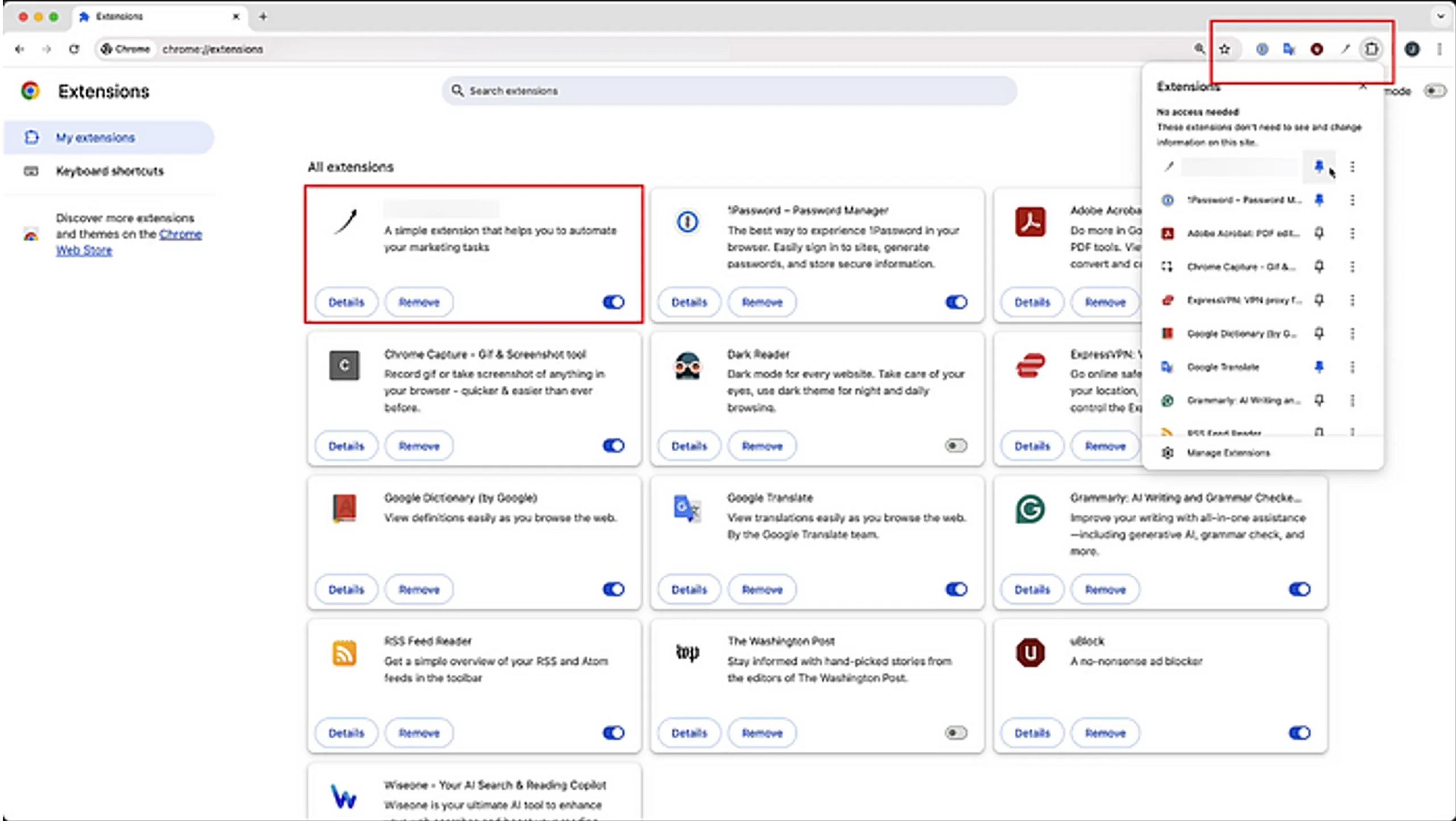
Polymorphic Extensions: The Sneaky Extension That Can Impersonate Any Browser Extension
Works Cited
Center for Internet Security. (2023). CIS Benchmarks. Retrieved from Center for Internet Security: https://downloads.cisecurity.org/#/
CrowdStrike. (2024). Browser Extension Assessment. Retrieved from CrowdStrike: https://www.crowdstrike.com/en-us/platform/exposure-management/browser-extension-assessment/
Cybersecurity and Infrastructure Security Agency. (2023). Evaluating Your Web Browser’s Security Settings. Retrieved from CISA: https://www.cisa.gov/news-events/news/evaluating-your-web-browsers-security-settings
Google Cloud. (2023). Increasing Endpoint Security with the Center for Internet Security’s Updated Chrome Browser Benchmark. Retrieved from Google Cloud Blog: https://cloud.google.com/blog/products/chrome-enterprise/increasing-endpoint-security-with-the-center-for-internet-securitys-updated-chrome-browser-benchmark
SquareX. (2024). Secure Browsing for Enterprises. Retrieved from SquareX: https://www.sqrx.com
Cybersecurity & Risk News, Updates, Resources
HALOCK Breach Bulletin
Exploit Insider
Cybersecurity Awareness Posters
